
ATO - Auto AUX Harness Installation Instructions

Updated: May 25
ATO - Auto LLC
February 2026

Table of Contents
1. FORScan
FORScan is available to download for free. You may obtain a 2 Month Extended License, no purchase required, allowing you to change several settings within your Ford or Mazda vehicle. FORScan is available for Windows and connects via USB to OBDII Cord into your vehicle. The entry level cord is an ELM327 that costs less than $30. For enthusiasts looking for a more heavy duty, reliable connection, the OBDLink EX is available for $70 on Amazon.
Download the latest version of FORScan to your computer
Get your free Extended License to obtain a free 2 month activation code
Launch the downloaded FORScan Setup & follow prompts to complete installation of the application
Click “About” and enter your activation code(Code may take up to 48 hours to send to you initially)


1b. Connecting Vehicle to FORScan
Insert the ELM327 or OBDLink EX into the USB Slot on your Windows Laptop
Plug into the OBDII Port of your vehicle and turn the ignition to Accessory(“Run” without turning the engine on)
Open FORScan, the application should automatically connect to the vehicle
Manual Connect if needed by clicking “Connect to vehicle”
Allow modules to be read, flip the MS/HS CAN Switch when prompted to complete all module scanning
Click “Configuration and Programming”
1c. Coding Options for FORScan
*Always take a picture and save the original coding of the vehicle to a file on your computer. You can easily alter critical vehicle functions with FORScan, so having a backup of the “tried and true” original codes that were on the vehicle is crucial.
x's are placeholders and should not be changed manually, only change the character with a * in its place, everything else will auto populate upon hitting write!
AUX Input-Media Button, Activates “Line-in”:
Module | Line Address | First 4 | Second 4 | Last 4 | Change * |
FCDIM As-Built | 7A5-01-01 | xxxx | *xxx | xxxx | 1 = AUX Enabled |
Powerpoint Timeout determines the shutdown time of the 12v Cigarette outlets after the key is turned off:
Module | Line Address | First 4 | Second 4 | Last 4 | Change * |
BCM As-Built | 726-39-01 | xxxx | x*xx | xxxx | 1 = Timeout Enabled(Default) 0 = Always On(Stays on 24/7, can deplete battery) |
BCM As-Built | 726-39-01 | 1194 | xxxx | xxxx | 1194 1hr 15min (Default) |
BCM As-Built | 726-39-01 | 0001 | xxxx | xxxx | 0001 Shut off after 1 Second(Recommended) |
1d. Useful Tips
Note: AUX and Powerpoint coding applies to both the 2013-2019 Ford Police Interceptor Utility(Explorer) and Sedan(Taurus)
2. Interior Trim & Dash Disassembly
Most of the Interior Trim and Dash Disassembly is nearly identical for the Gen 1 2013-2015 FPIU and the Gen 2 2016-2019 FPIU. The 2013-2019 FPIS involves more time to remove the dash to get to the APIM connector, a full step-by-step is not currently available here.
2a. 2013-2019 Ford Police Interceptor Utility
Remove the 2 side trim moldings around the center bezel with the help of a pry tool to pop the clips out without marring the plastic.

Remove the 4, 7mm Bolts holding the center bezel in place.
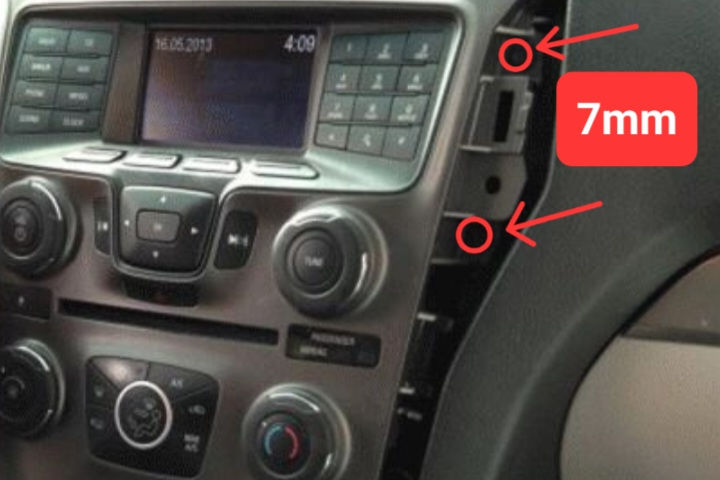
Pull the center bezel out of the dash, it may take some effort as it does retain itself firmly. There will be a connector you have to release from the back of the center bezel.
Remove the 4, 7 mm Bolts from the APIM(CD Player) and remove the APIM.

Unplug the APIM connector to prep for AUX Harness Pin Installation

3. Installation of AUX & Bluetooth
The pinout remains the same for all vehicles when connecting the 4 pins of the AUX Harness into the APIM connector.
3a. AUX Harness APIM Install
Insert the 4 pins of the AUX Harness into the back of the APIM connector; Pin 6-Blue or Black, Pin 18-Yellow, Pin 17-White, Pin 16-Red/Blue or Black.
NOTE: The Locking Clip should be on the side that the arrow is in the photo below. **The Pins are inserted from the back, but the connector diagram is from the front. This results in confusion, so note the small numbers on the back of your connector 1 & 13 seen in the photo below, to help guide orientation of the pins.


Perform a test of the AUX harness by plugging it back into the APIM/receiver. Do not bolt anything in yet; you will also have to reconnect the center bezel with its connector to push the Media Button.

If you are adding Bluetooth, go to section 3b. Otherwise, if the AUX Harness is working, you may now begin reinstallation to complete the installation.
If desired, use the included template to cutout a space for the AUX to mount.


You have now successfully added AUX Input to your Ford Police Interceptor.
3b. Optional Bluetooth Adapter Install
Plug the 3.5mm AUX of the Aston Innovation Bluetooth Adapter into the AUX Harness.
Plug the Bluetooth adapter USB into a 12v power source and follow the instructions on the box to connect your phone.
Utilize FORScan to change the “Powerpoint Timeout” for immediate shut down of power at the cigarette plugs when the key is turned off. This will allow for seamless disconnection of Bluetooth from your phone.
Test the function of the powerpoint timeout with the Bluetooth adapter.
To keep wiring neat, secure any excess wire using zip ties or Tesa tape.
Secure the AUX Harness and excess wiring to the back of the HVAC Module, located directly below where the APIM/receiver mounts. For best appearance, only the USB Power and Bluetooth adapter should be exposed, everything else should be neatly tucked away during installation.
Reverse the process of removal to complete the installation.
If done correctly, the Aston Innovation Bluetooth receiver will sit in a convenient and sleek spot on the center bezel.

4. General Product Information
For any questions or issues that are not listed please call 715-240-4070 or email admin@ato-auto.com. Due to an increase in email and call volume, please allow up to 48 hours for a response.
4a. Common Questions
How long does the install process usually take?
Between 30 minutes and 1 hour, but take your time to avoid breaking trim tabs and inserting the pins into the wrong slots.
Is the AUX with Bluetooth better than an FM Transmitter?
Absolutely, the Bluetooth adapter is a true Bluetooth Receiver with a built-in audio filter. The Aston Innovations Bluetooth Adapter sends a crisp audio signal thru the AUX Harness. The sound is clear and has all the punch of a factory equipped sound system, unlike FM Transmitters.
4b. Troubleshooting
Few issues have been reported outside of users being unsure of installation procedures. Issues that have been noted and the current fixes are as follows:
Audio Volume very quiet and/or “noise” in the speakers?
AUX Harness pins may not be seated fully and clipped in. Double check to verify that all 4 pins are seated fully and in the correct pin slots.
Audio only coming through one side of the vehicle speakers?
Verify your pins are in the correct slots. This is typical of when pins have been inserted into the wrong pin slots.
Audio has hum or buzz only when a specific device or AUX cord is connected?
Some devices and cords may not be compatible due to quality issues. Many, if not all, Amazon and aftermarket CarPlay display AUX outputs are known to be faulty. If you have an AUX connection directly to a CarPlay display unit, this is likely the cause of unwanted noise/crackling present in the audio. To remedy, utilize the Bluetooth Adapter and set the CarPlay display audio output to BT audio. Connect your phone to the Bluetooth Adapter. Doing this will allow your phone to send audio to the Bluetooth Adapter while simultaneously sending a display signal to the CarPlay display.


Comments